Orchestration — The Complete Guide
How to make several AI agents work together — without colliding, duplicating, or forgetting
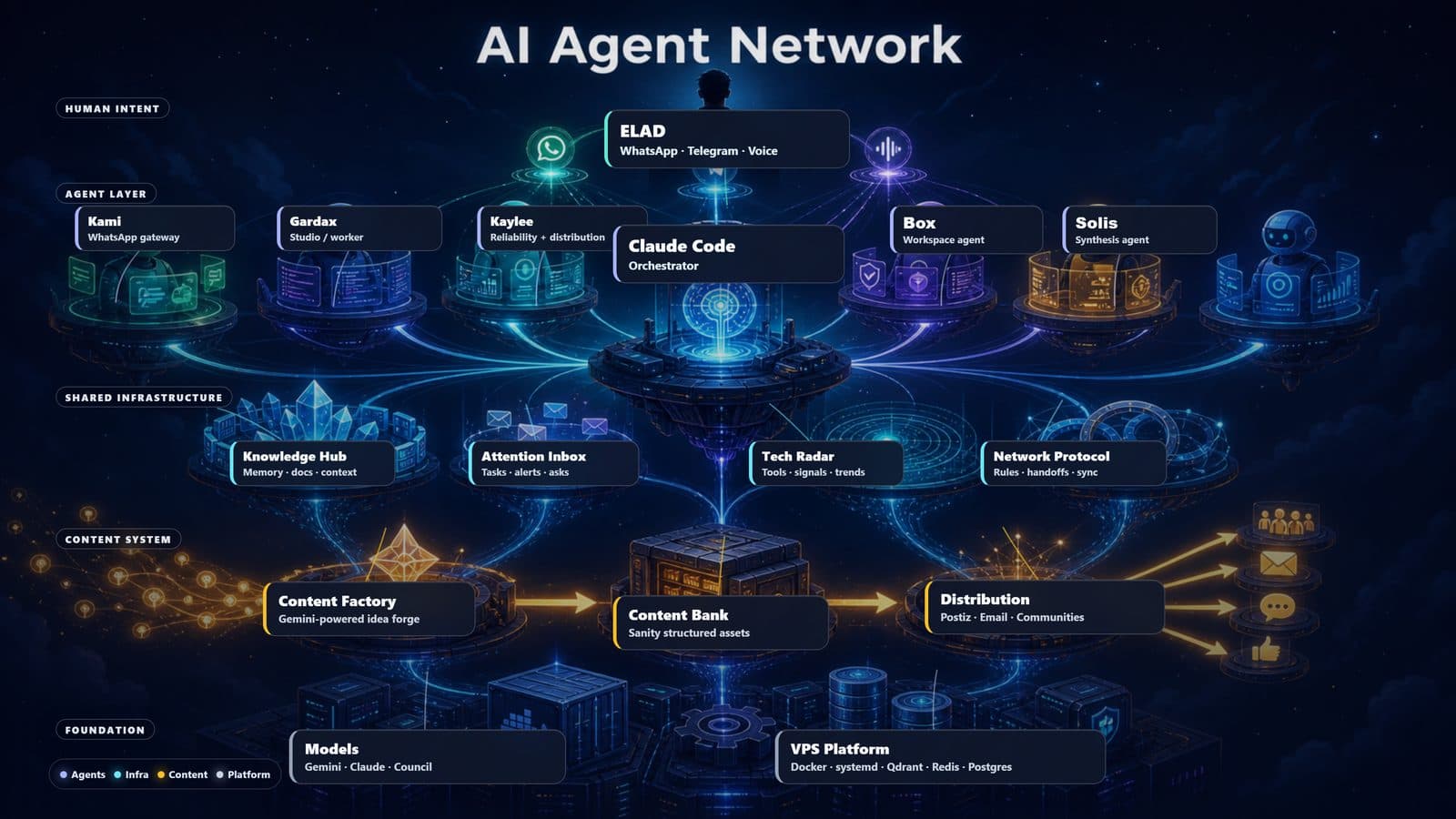
A single agent is a tool. A network of agents is a force — but only if they know how to work together. This guide is the 'glue' connecting the others: how Kami (WhatsApp interface), Claude Code (dev orchestration), Hermes (studio/worker) and Kaylee (reliability + distribution) share knowledge, delegate tasks to each other, and don't step on one another. The real problem in a multi-agent network isn't each agent's capability — it's coordination: who knows what, who owns what, and how important information reaches whoever needs to act on it. In my setup (Elad) this is solved with four simple components: a shared-knowledge hub (one source of truth), an attention inbox that prioritizes what needs handling, a network protocol that defines roles and delegation, and a council of models that validates big decisions. For you — the exact same pattern works for any team of agents, whether two or ten.
What this guide covers
What is multi-agent orchestration?
The difference between a pile of bots and a team that works together
Orchestration is the layer that makes several autonomous agents function as one team instead of a pile of bots each doing its own thing. The core idea: don't try to build one super-agent that does everything — build several focused agents, and invest the effort in coordinating between them. Just like a human team, what determines success isn't each individual's talent but how they divide the work, pass information, and avoid stepping on each other.
The shared knowledge hub — one source of truth
Instead of each agent remembering alone, everyone writes to and reads from one place
The first problem in a multi-agent network: each agent with its own memory, and nobody knows what the other did. The solution is a shared-knowledge hub — one append-only event log that every agent writes facts to, and every agent can read from. This is the network's SSOT (Single Source of Truth): the full history of what happened, who did what, and the result.
The attention inbox — the orchestrator's work queue
Separate 'what happened' from 'what needs handling now'
If you only ask the knowledge hub 'what's new?' every round — critical info rots and gets forgotten. So above the hub sits an attention inbox: a focused work queue of 'what needs the orchestrator's attention'. Agents push action items into it (not every event — only what needs action), the orchestrator (Claude Code) reads it every round, acts, and marks 'done'. That's the difference between a network that 'hopes someone notices' and one where important info truly reaches its destination.
The network protocol — delegation matrix and task ownership
The 'harmony map': who owns what, and who delegates to whom
When you have several agents, the critical question is 'who does what'. The network protocol is one canonical document every agent reads — a roster (who exists and their role), a delegation matrix (which task goes to which agent), and coordination channels. But the most important part is cultural: task-ownership discipline — an agent that receives a task takes end-to-end responsibility for it (understands start-middle-end, leads it, and reports the result), not just 'acknowledges receipt'.
The council of models — validating big decisions
Before an irreversible move, ask several models — not just one
One model carries its own biases. For a big decision (architecture, an irreversible move, an ethical question) a second and third opinion are worth it — from different models, not just the same one. A council of models is a pattern where the orchestrator consults several peer models (mine are GPT, Grok and Gemini) and synthesizes — with one simple rule: if 2 of 3 agree it's a good direction, but you also read the dissenter (sometimes the dissenter is right).
Case study: the content factory
How all the components connect into one end-to-end flow
All the components connect nicely in a real case study: the content factory. An idea comes in, gets processed for every platform in one consistent voice, is saved in a classified bank, and distributed to all channels — all coordinated through the four components above. It illustrates why good orchestration turns a pile of capabilities into a production line.
Integration — how to adopt this yourself
Start small, add a coordination component only when the pain appears
The most important thing to understand: you don't build the whole orchestration layer on day one. Start with two agents and one coordination component, and add the rest only when the pain appears. Each component solves a specific pain — don't adopt a component before you've felt the problem it solves.